Place in fonts subdirectory.
STYLE.CSS
In CSS code:
@font-face {
font-family: “FalenaRegular”;
src: url(“fonts/FalenaRegular-font.woff”) format(‘woff’);
}
@font-face {
font-family: “JuanaLightItalic”;
src: url(“fonts/JuanaLightItalic-font.woff”) format(‘woff’);
}
@font-face {
font-family: “RidleyGroteskMedium”;
src: url(“fonts/RidleyGroteskMedium-font.woff”) format(‘woff’);
}
@font-face {
font-family: “RidleyGroteskRegular”;
src: url(“fonts/RidleyGroteskRegular-font.woff”) format(‘woff’);
}
body {
color: rgba(0,0,0,1);
line-height: 1.8 !important;
letter-spacing: 0.02em;
font-size: 13px !important;
font-family: ‘RidleyGroteskRegular’;
font-weight: 400;
font-style: normal;
}
h1.entry-title {
color: #000000;
text-align: center !important;
text-transform: uppercase;
font-size: 40px !important;
line-height: 1.2;
letter-spacing: 0em;
text-align: left;
font-family: ‘JuanaLightItalic’;
font-weight: 500 !important;
font-style: normal;
}
h1.banner-line1, .banner-line1 .et_pb_text_inner h1 {
color: rgba(255,255,255,1);
text-align: center !important;
text-transform: uppercase;
font-size: 40px !important;
line-height: 1.2;
letter-spacing: 0em;
text-align: left;
font-family: ‘JuanaLightItalic’;
font-weight: 500 !important;
font-style: normal;
}
h1.banner-line2, .banner-line2 .et_pb_text_inner h1, .banner-line2 {
color: rgba(255,255,255,1);
text-transform: uppercase;
line-height: 1.2;
letter-spacing: 0.2em;
font-size: 18px !important;
text-align: center !important;
font-family: ‘RidleyGroteskMedium’;
font-weight: 500 !important;
font-style: normal;
}
.h2-header .et_pb_text_inner h2 {
font-size: 18px !important;
color: rgba(0,0,0,1);
text-transform: uppercase;
line-height: 1.2;
letter-spacing: 0.2em;
text-align: center;
font-family: ‘RidleyGroteskMedium’ !important;
font-weight: 500 !important;
font-style: normal;
}
Use in Text Module
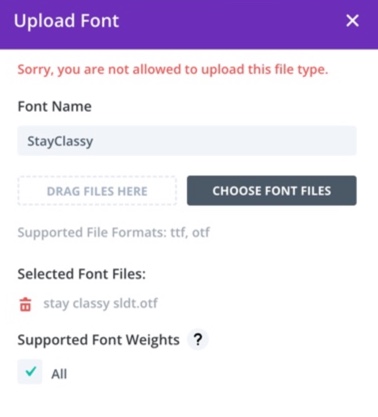
On the Liz Patey class we’ve used HTML in the text modules directly e.g. <span class=”StayClassy”>This is my custom font</span> but this didn’t seem to work on The Fine Touch. We had to add the custom font via the Text Module settings and then go to the Design tab -> Font option, click on Upload and you should be able to select your custom font from your computer. It’s then available to re-use elsewhere.
Client Sites
Client sites using custom fonts:
The Fine Touch
Error Using Font in Divi Text Module
Add this to the functions file if you are getting an error trying to add a custom font
define(‘ALLOW_UNFILTERED_UPLOADS’, true);